
Reporting a map issue
CityWalker's streets come from OpenStreetMap, which is community-maintained. Occasionally a path is missing, the wrong type, drawn incorrectly, or marked as walkable when it is not. If you spot something wrong while looking at the map, you can send me a report in a few taps.
How to report an issue
-
1Open the map. Either the walk detail map or a city's coverage map.
-
2Long-press the spot on the map where the problem is. CityWalker captures that exact location for you.
-
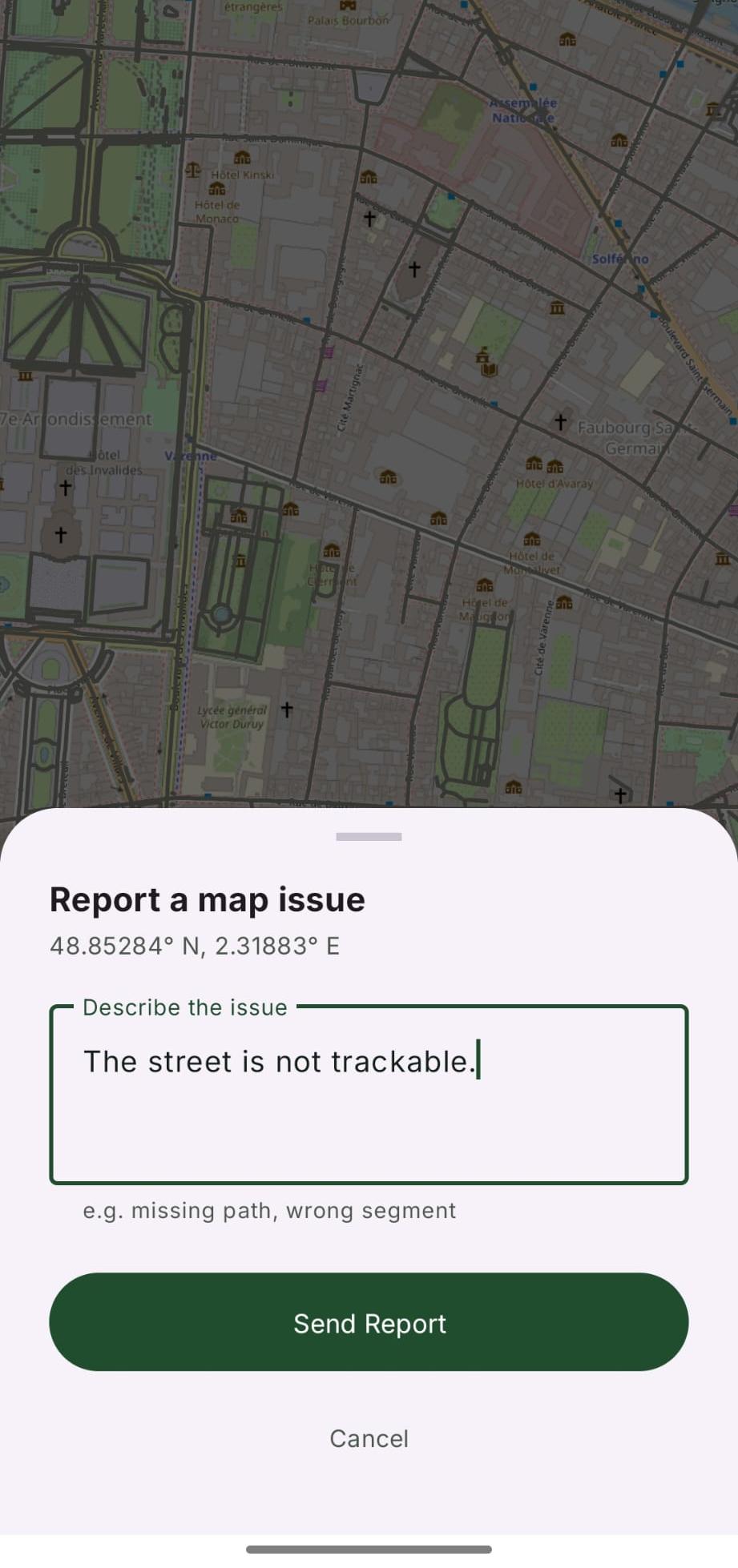
3A Report a map issue sheet opens. Describe what's wrong, for example a missing path or a wrong segment.
-
4Tap Send Report. Your email app opens with the details already filled in.
What gets sent
A report is just a plain email, prepared for you and sent through your own email app. Nothing is sent automatically or in the background. The pre-filled message includes:
- The coordinates of the spot you long-pressed.
- The city the location belongs to.
- A link to OpenStreetMap centred on that spot, so the issue is easy to locate.
- Your description of the problem. That's all. No personal data, no walk history, no other context is included unless you add it yourself.
What happens next
Reports go straight to me. I read every one. Some are easily fixed in the app, some help me identify a pattern and some can be an issue with the OSM data which need fixing there. So a fix benefits everyone walking that area, not just you. I will usually reply to let you know what I found.
If no email app is set up on your phone, CityWalker will let you know instead of sending. You can still reach me any time at [email protected].